

You made the plan. H3Safe gets everyone on the same page.
H3Safe delivers your safety plan to every technician, collects their signature, and feeds confirmation back to H3ightboard — before anyone leaves the ground.
What changes when H3Safe is live
From binders, pdfs, and text-message reminders to signed safety records visible before dispatch.
- Binders of JSAs and rescue plans
- PDF email chains for signatures
- Text-message reminders to sign
- No visibility until crew is on site
- Digital JSAs with hazard identification
- Signatures collected before dispatch
- Safety status visible on H3ightboard
- Missing docs block dispatch automatically
How it works
Three workflows that change your daily operation.
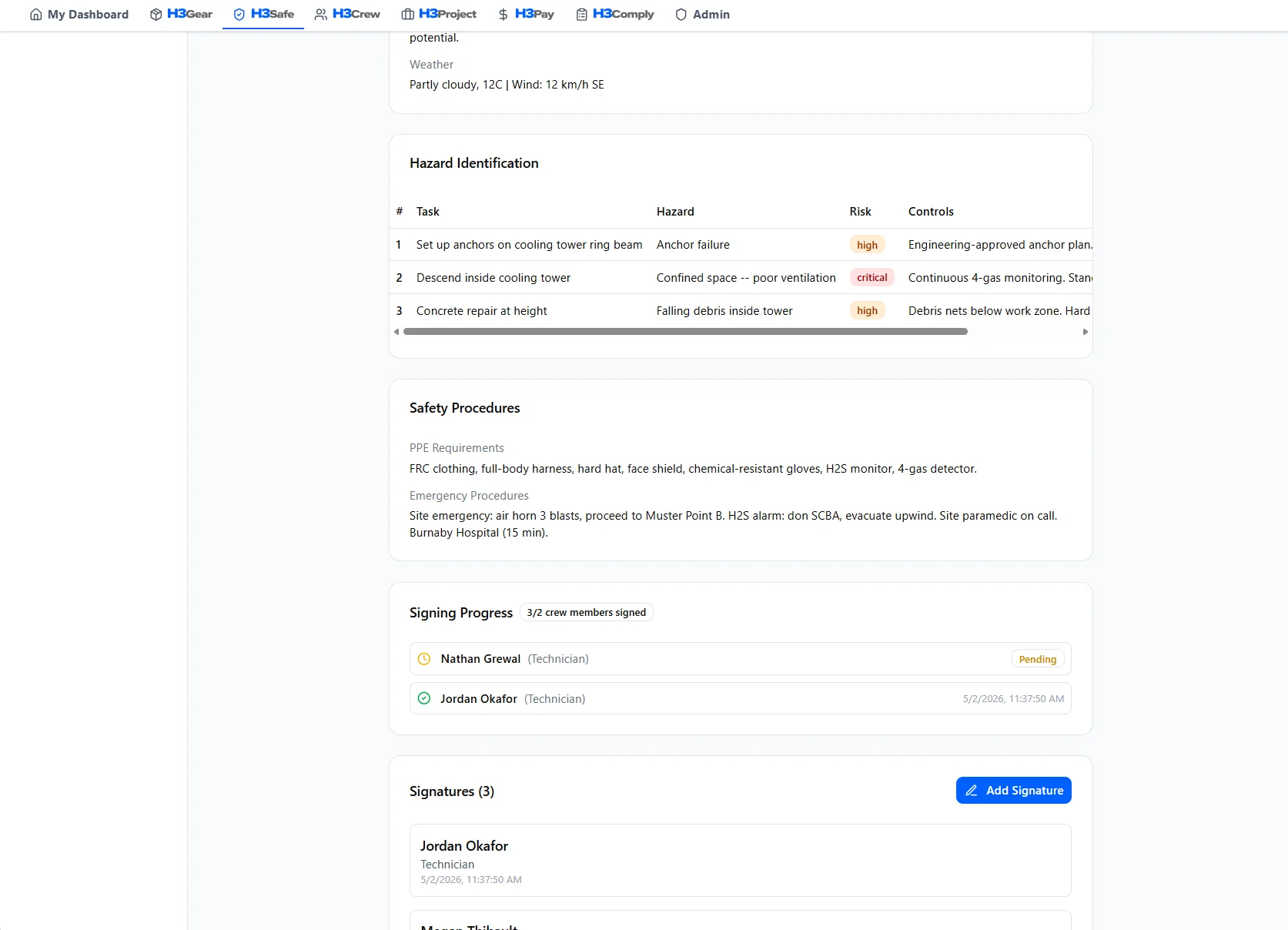
Create and review JSAs
Build JSAs with hazard identification, risk assessment, and control measures. Templates for common scenarios or build custom documents for each job.
Track signatures and blockers
See who has signed and who hasn't. Unsigned safety docs surface as dispatch blockers on H3ightboard — no more chasing texts.
Attach safety docs to dispatch preflight
Safety packages travel with the dispatch packet. JSA, SWP, rescue plan, and toolbox talk — all linked to the project and ready for the crew.
Why H3ight is different
Most tools capture data. H3ight turns it into a go/no-go dispatch decision.
Decision layer, not form capture
Generic tools record the JSA or inspection. H3ight tells you whether the crew can actually go.
Blockers surface automatically
Spreadsheets and group chats hide what's blocking a job. H3ightboard makes blockers visible before dispatch.
Cert gating built in
IRATA/SPRAT L1–L3 cert requirements are baked into staffing and scheduling — not bolted on after the fact.
One record, bid to audit
From bid to dispatch to audit bundle — one connected record with no re-keying across disconnected tools.

How H3Safe shows up on H3ightboard
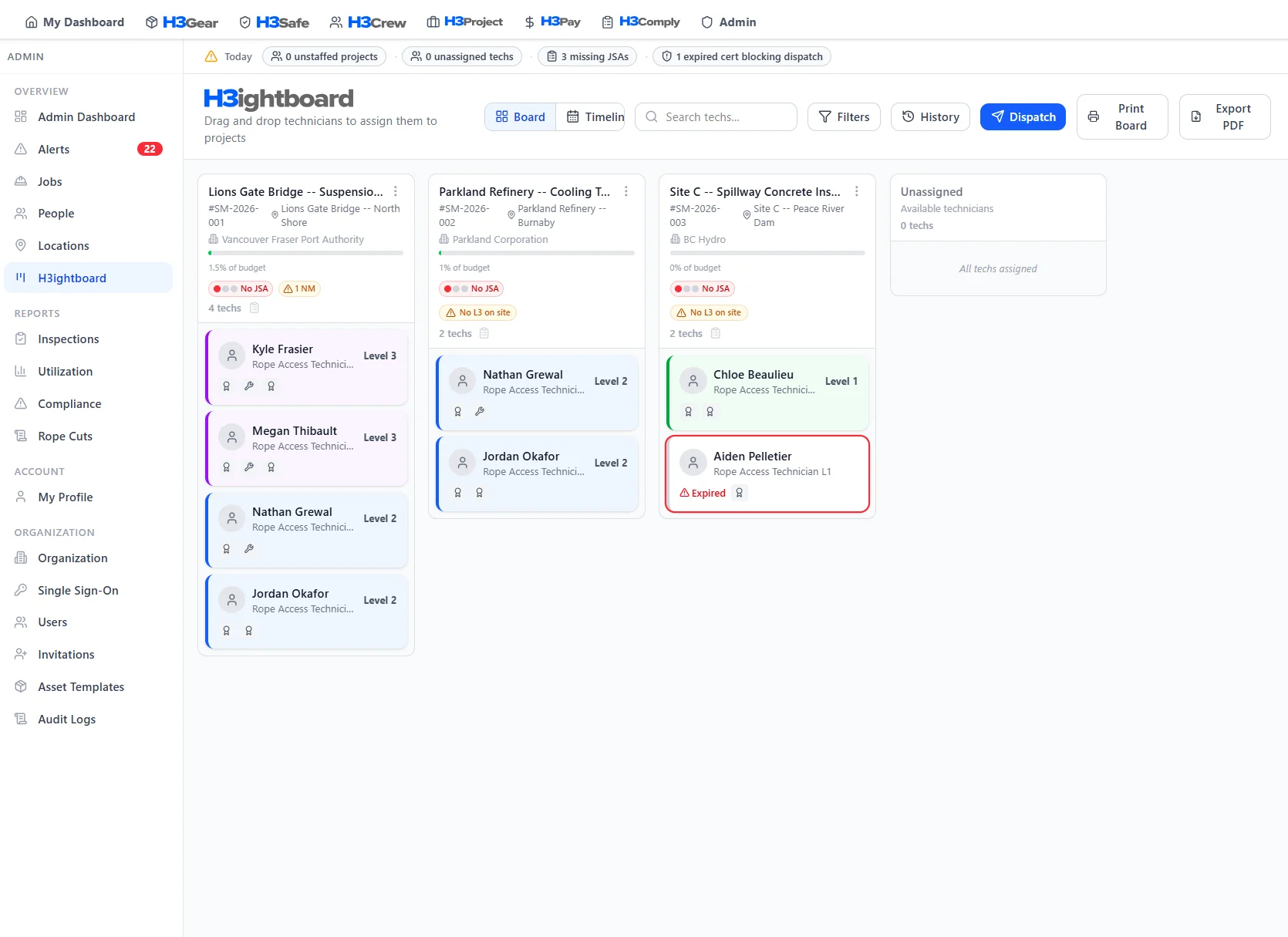
Safety signals on H3ightboard tell you which projects have signed JSAs and which are missing paperwork — before the crew leaves the yard.
 Board signals
These signals surface on every project column in H3ightboard, so nothing gets dispatched without visibility.
Better with the full platform
H3Safe works on its own — but it gets more powerful when connected to the rest of H3ight.

Deployed equipment appears in the JSA. Inspection status visible right in the safety doc.
Learn more
Only certified techs appear on JSAs. Cert status checked automatically.
Learn more
Safety packages attach to projects. Clients get JSAs with their invoices.
Learn more
Safety KPIs and incident data flow into compliance dashboards.
Learn more
Safety-related costs and per diem tied to each job's requirements.
Learn moreFrequently Asked Questions
Common questions about H3Safe
Stop dispatching crews with unsigned safety docs.
See how the H3Safe module feeds your H3ightboard. Book a walkthrough.